• Web Development
Is It Time to Replace Your Website? 8 Signs Your Site Is Costing You Business
Your website might look fine to you. But if it was built more than three years ago, there's a good chance it's actively turning customers away. Here's how to tell.
When was the last time you actually looked at your website? Not glanced at it on your laptop — properly used it. On your phone. Tried to fill in your own contact form. Read it like a customer would.
Most people haven’t done this since the site went live. And that’s the problem. Websites don’t age gracefully. They don’t gradually get a bit tired. They work fine, then one day they’re actively losing you business and you don’t even know it.
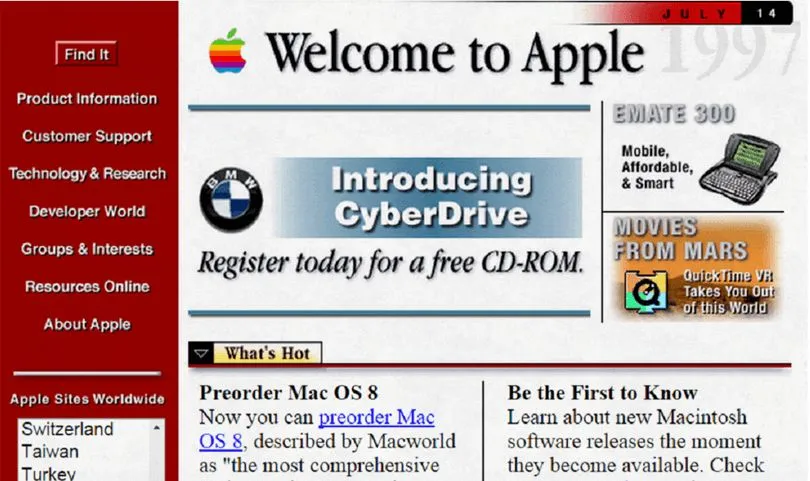
I look at broken websites every week. Not broken as in “the server’s down” — broken as in the contact form doesn’t work on mobile, Google’s stopped showing it to anyone, or it looks like it was built during the last World Cup. Which it probably was.
Here are the eight signs I keep seeing.
1. It doesn’t work properly on phones
This is the big one. Over 60% of web traffic in the UK now comes from mobile devices. For local businesses – restaurants, trades, salons – it’s often closer to 75%.
If your site was built before around 2020 and hasn’t been touched since, there’s a real chance it either isn’t mobile-friendly at all or has a “mobile version” that’s clunky and frustrating to use. Tiny text, buttons too small to tap, content that spills off the edge of the screen.
Google also uses mobile-friendliness as a ranking factor. So a site that’s awkward on phones gets penalised twice: once by visitors who leave, and once by Google pushing you down the results.
Pull out your phone right now and try to complete the most important action on your site – whether that’s filling in a contact form, viewing your menu, or finding your phone number. If it’s annoying, your customers think so too.
2. It’s built on a platform that’s been abandoned
I’ve seen sites still running on platforms like Adobe Muse (discontinued in 2020), old versions of Joomla with no security updates, or ancient WordPress installations with plugins that haven’t been updated in years.
If the platform your site was built on is no longer actively maintained, you’re living on borrowed time. Security vulnerabilities don’t get patched. New browser features break things. And finding someone who can work on it gets harder and more expensive every year.
One client came to me after their developer simply disappeared – the agency had gone bust, and nobody else could work with the bespoke system they’d built. The whole site had to be rebuilt from scratch. That’s an expensive lesson.
3. It takes forever to load
People are impatient. Research consistently shows that if a page takes more than three seconds to load, roughly half your visitors will leave before they see anything. Three seconds. Gone.
Older sites tend to accumulate bloat over time – unoptimised images, outdated plugins, heavy scripts that nobody needs anymore. I’ve audited sites where a single page was trying to load 15MB of data. For context, a well-built page should be under 2MB.
You can check your own site speed for free using Google’s PageSpeed Insights. If you’re scoring below 50 on mobile, that’s a problem. Below 30? That’s an emergency.
4. You can’t update it yourself
This one frustrates me more than anything. I regularly meet business owners who have to email their developer every time they want to change a phone number or update their opening hours. And then wait days – sometimes weeks – for it to happen.
Your website should work for you, not create admin. If you can’t make basic updates yourself, or if every small change requires a developer and a bill, the site isn’t set up right.
Now, some people genuinely don’t want to manage their own site – that’s fine, and it’s exactly why I offer monthly plans that include unlimited content updates. But you should at least have the option.
5. It looks dated compared to your competitors
Design trends move fast. What looked modern in 2021 – heavy drop shadows, cramped layouts, small body text, sliders on every page – looks noticeably tired now.
I’m not saying you need to chase every design trend. But when a potential customer is comparing you against three competitors and your site looks like it’s from a different era, it undermines trust. Fair or not, people judge businesses by their websites.
Do this: open your site and your top three competitors’ sites side by side. If yours looks like it belongs to a different decade, customers are noticing.
6. There’s no HTTPS (the padlock)
If your website address starts with “http://” instead of “https://”, you’ve got a problem. That little padlock icon in the browser bar isn’t just decoration – it means the connection between your visitor and your site is encrypted.
Without it, browsers like Chrome actively warn visitors that your site is “not secure.” For any business that takes enquiries, bookings, or payments through their site, that’s a deal-breaker. Nobody’s filling in a contact form when their browser is flashing warnings at them.
SSL certificates (the thing that gives you HTTPS) are free these days through services like Let’s Encrypt. If your current site doesn’t have one, it’s either because your hosting is ancient or nobody’s bothered to set it up. Either way, it needs sorting.
7. You’re invisible on Google
Here’s a simple test: search for the main service you offer plus your area. Something like “plumber Bristol” or “wedding photographer Bath.” If you’re not appearing anywhere in the first couple of pages, your website isn’t doing its job.
Now, SEO is a long game and I’m not going to pretend that a new website automatically puts you at number one. But older sites often have fundamental problems that make it almost impossible to rank – missing meta descriptions, no heading structure, duplicate content, broken links, no mobile optimisation.
A properly built modern site gives you the foundation to actually compete. Without that foundation, all the SEO work in the world won’t help. I’ve written more about this in my post on why your website isn’t getting enquiries.
8. You’re getting hacked or spammed
If you’re getting spam form submissions daily, if your site has been flagged by Google for malware, or if mysterious pages have appeared that you didn’t create – your site’s security has been compromised.
This is depressingly common with older WordPress installations that haven’t been maintained. Outdated plugins are the number one attack vector, and once someone’s in, they can use your site to send spam, host phishing pages, or redirect your visitors to dodgy sites.
If this has happened to you, a cleanup might fix the immediate problem. But if the underlying platform is outdated and unpatched, it’ll happen again. At some point, rebuilding on a secure foundation is cheaper than constantly firefighting.
When a refresh is enough (you might not need a rebuild)
I want to be honest here, because not everyone who reads this needs to spend money on a new website. Sometimes what you’ve got is fundamentally sound and just needs some attention.
A refresh might be enough if:
- Your site is built on a modern, maintained platform (recent WordPress, Squarespace, Wix, etc.)
- It’s already mobile-friendly but just looks a bit tired
- The structure is logical and the content is mostly accurate
- Loading speed is reasonable (above 50 on PageSpeed Insights)
- You mainly need updated content, fresh images, and minor design tweaks
In those cases, a few hours of work can make a genuine difference without the cost or disruption of starting over. I’ll always tell you if I think a refresh is the smarter option.
What a rebuild actually involves
If you do need a new site, it’s worth understanding what that looks like – because it’s probably less disruptive than you think.
A typical rebuild for a small business site takes me two to three weeks from start to finish. The process roughly looks like this:
- Discovery – I look at your current site, your competitors, and what’s actually working. We talk about what you need the site to do.
- Design and build – I create the new site on a staging environment (a private version you can review before it goes live). You see it, give feedback, we refine.
- Content migration – Any content worth keeping from your old site gets moved across. Nothing valuable gets lost.
- Launch – The new site goes live, usually with zero downtime. Your domain stays the same.
- Ongoing support – Updates, tweaks, and maintenance handled for you.
For a breakdown of what this typically costs, have a look at my post on how much a website costs in the UK.
Switching without losing your Google rankings
This is the bit that worries most people, and rightly so. If your current site has some Google presence – even if it’s not great – you don’t want to throw that away.
The key is proper redirects. Every page on your old site needs to point to the equivalent page on the new one. If URLs change (and they often do in a rebuild), 301 redirects tell Google “this page has permanently moved here.” Done properly, you keep your existing rankings and typically see them improve within a few weeks as Google recognises the better site.
I’ve handled dozens of these migrations and I build the redirect map into every rebuild project. It’s not optional – it’s part of the job.
Other things that protect your rankings during a switch:
- Keeping your domain name the same
- Maintaining (or improving) your page titles and meta descriptions
- Ensuring the new site has at least as much quality content as the old one
- Submitting the updated sitemap to Google Search Console
- Monitoring rankings for a few weeks after launch to catch any issues
A lower-risk way to get started
I know that committing to a website rebuild feels like a big decision, especially if you’ve been burned before by developers who over-promised and under-delivered.
That’s exactly why I offer monthly plans starting from £69/month with no upfront cost. You get a professionally designed, fast, mobile-friendly site – and if it’s not working for you, you’re not locked into a massive contract. I also handle all the hosting, maintenance, security updates, and content changes, so you’re not left managing something you didn’t sign up for.
It’s designed to remove the risk. You get a better website, I handle the technical side, and you can focus on actually running your business.
If you’re reading this and ticking off more than a couple of those signs, it’s probably time to have a conversation. I’m happy to take a look at your current site and give you an honest assessment – no charge, no obligation. Sometimes the answer is “you’re fine, just fix these two things.” And I’ll tell you that.
Get in touch and let’s figure out what makes sense for your situation.
9 min read

Oscar Beamish
Freelance Web Developer, Bristol
I build custom websites and HTML5 banner campaigns for clients across the UK. 10+ years of experience, clients include Sony, Activision, and Riff Raff Entertainment (Jude Law). More about me →